Icon of program: Leap

Leap for Mac

  • Trial version
  • 3.4
    10
  • 2.7K
  • V4.0.7

Find anything on your Mac

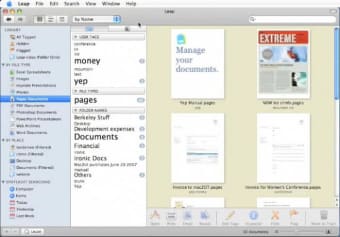
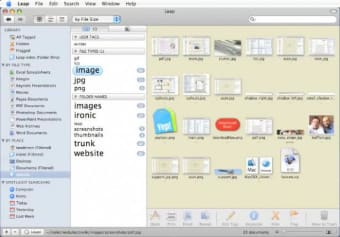
Leap is a pretty ingenuous little app that lets you find any file on your Mac, even if you're not sure where it is. Whereas Mac's Spotlight is purely based on search, Leap also incorporates tags, places, file types and more. You can use the find-as-you-type search feature or simply one of the many other options available. We quite like the center column of Leap, where tag size is relevant to the amount of corresponding files. Leap will also reference all file types and let you search according to them. You'll also notice that it includes Spotlight search, placed at the bottom left of the interface.

Top Recommended Alternative

The friendly GUI shows thumbnail views of all your files and you can close up or zoom in on any one of them with the loupe function. Double clicking on an item will open it in a popup window. Any file can be flagged for future reference or hidden. You can also view and edit information for files, like adding tags to make them easier to find.

Leap was a bit sluggish at startup, when it referenced all files in the system, but once up and running it worked well. Given the number of search possibilities at hand, you're bound to find what you're looking for. If there's one other little complaint we could place, it's that the interface can feel a bit crowded, what with all the lists and different items present in the program window.

Leap is an excellent program giving you multiple ways of finding any file in your Mac.
  • Pros

    • Organize by tags and places
    • Zoom into items
    • Closeups
  • Cons

    • Interface can feel a bit crowded
 0/2

App specs

Also available in other platforms

Program available in other languages


Icon of program: Leap

Leap for Mac

  • Trial version
  • 3.4
    10
  • 2.7K
  • V4.0.7

User reviews about Leap

Have you tried Leap? Be the first to leave your opinion!

Add review

You may also like

Explore Apps

Latest articles

Laws concerning the use of this software vary from country to country. We do not encourage or condone the use of this program if it is in violation of these laws.
Softonic

Is Leap safe?

100/100

Score result: Clean

This file passed a comprehensive security scan using VirusTotal technology. It is safe to download.

  • Virus free
  • Spyware free
  • Malware free
  • Verified by Security Partners

    VirusTotal logo

Scan Info

Last scan
Saturday, October 25, 2025
Scan provider
VirusTotal · Full report

File Integrity

File
Leap_V4.0.7.zip
SHA256
2404b5ae535f8130d463cfe0994486519bf2e7121bcd826121f459faba1582b4
SHA1
97dea9599dc3f6099ef7de9b188f2ab454ca9fcb

Softonic security commitment

Leap has been thoroughly scanned by our advanced security systems and verified by industry-leading partners. This file comes from the official developer and has passed all our security checks, showing no signs of viruses, malware, or spyware. For more information, visit our Security and Trust Center